Prompt Gen Tool
We Want Your Feedback! 💬
Help us improve the Prompt Gen Tool! Share your experience, report bugs, or suggest new features.
Takes only 3-5 minutes. Your input directly influences our roadmap!
What is the Prompt Generation Tool?
The Prompt Generation Tool is an automated system that creates structured workflows for AI agents learning to use web applications. Instead of developers manually designing workflows, this tool takes a gym specification document as input and generates high-quality, structured workflows through an automated process.
Think of it as: A smart assistant that reads the gym's specification sheet and generates realistic, validated workflow templates for any RL gyms.
Purpose and Objectives of the Tool
Main Goals
- Automate workflow creation - Generate workflows from gym spec documents automatically
- Save development time - Generate workflows in a short time instead of hours
- Ensure quality - Every workflow follows OTS prompting guidelines docs automatically
- Enable scalability - Create workflows for any gym with a web application domain
- Provide reusable templates - Workflows adapt to different gym instances and environments automatically
High-Level Benefits
| Benefit | Description |
|---|---|
| Save Time | Generate workflows 100x faster than manual creation |
| Consistent Quality | All workflows automatically follow OTS guidelines (difficulty distribution, prompt types, natural language) |
| Dynamic & Reusable | Workflows work across different gym instances with similar features |
| Spec-Driven | Takes gym specification documents and generates workflows automatically |
| Works for any domain | Works for e-commerce, delivery application, project management, marketing, sales, customer service, task management, and any other domain |
Transformation
This tool transforms a tedious, error-prone manual task into an automated, reliable process. You provide your gym specification document, and it produces structured workflows.
Problem Statement & Context
Manual Workflow Generation Challenges
Currently developers had to manually design workflows and write prompts. This created several problems:
1. Time Consuming Process
- Writing 10+ workflows and prompts manually takes hours or even days
- Each workflow needs careful crafting to match the application's features
- Developers spend valuable time on repetitive work
2. Static Content Problems
- Prompts were hardcoded with specific values: "Add iPhone 15 Pro to cart"
- These prompts break when data changes (product discontinued, renamed, etc.)
- Not reusable across different gym instances (example: dashdoor for meta and doordash for amazon may have different data with similar SQL schema) or environments
3. Inconsistent Quality
- Different developers write prompts in different styles
- Hard to maintain the required difficulty distribution (20% easy, 20% medium, 60% hard)
- Easy to mix up prompt types NRD, RD and Hybrid (combination of RD and NRD)
4. No Validation Mechanism
- Manual prompts are pure text with no validation
- No way to check if data exists before execution
- Prompts fail at runtime when required data is missing
- No SQL queries or dynamic variables existed in the manual approach
5. Scalability Issues
- Each new gym (application) requires starting from scratch
- Difficult to maintain prompts as schemas evolve
- No systematic way to ensure coverage of all features
Problems Solved by This Tool
1. Time & Resource Efficiency
- Generate workflows in minutes instead of hours
- Developers focus on important work instead of repetitive tasks
2. Dynamic Adaptability
- Workflows are abstract and reusable
- Works across multiple gym instances without modification
- No breaking when features are similar across gyms
3. Quality & Consistency
- OTS guidelines are enforced automatically
- Correct difficulty distribution (20/20/60) guaranteed
- Clear separation between NRD, RD and Hybrid prompts
4. Scalability
- Multi-domain support: works for any web application type
- Rapid onboarding: new gyms ready in minutes
- Easy maintenance: regenerate when specs change
5. Workflow Automation
- Automated workflow generation from gym spec documents
- End-to-end pipeline from spec to ready-to-use workflows
Key Impact
This tool transforms workflow generation from a manual, error-prone bottleneck into an automated, scalable system that produces high-quality, structured workflows following industry best practices.
OTS Prompting Guidelines Compliance
This tool automatically enforces OTS prompting guidelines, so you don't have to worry about compliance.
Most Important Requirements
1. Difficulty Distribution (automatically enforced by the tool)
| Difficulty | Percentage |
|---|---|
| Easy | 20% |
| Medium | 20% |
| Hard | 60% |
- 20% Easy: Single action, simple queries
- 20% Medium: 2-3 actions with JOINs
- 60% Hard: Complex multi-step workflows
2. Prompt Types (tool separates these automatically)
| Type | Description |
|---|---|
| NRD (Non Response Dependent) | Action commands that change state |
| RD (Response Dependent) | Analysis requests requiring reasoning |
| Hybrid | Combination of RD and NRD prompts |
3. Objectivity
All prompts must be measurable and verifiable
4. Natural Language
Prompts sound like real user requests
Automatic Compliance
The tool ensures that generated workflows automatically comply with all OTS prompting guidelines, including difficulty distribution, prompt type separation, objectivity, and natural language requirements.
Workflow Generation
Purpose
Convert gym specification documents into abstract, structured workflows that define realistic user scenarios and tasks for RL training.
Process Overview
Input
- Gym specification document - Describes application features, entities, actions
- Desired counts - For each type (NRD, RD, Hybrid)
- Complexity distribution preferences - Easy, Medium, Hard percentages
Process Steps
1. Spec Analysis
- Tool reads and analyzes the gym specification
- Identifies key features, entities, and user actions
- Understands the application domain (e-commerce, healthcare, etc.)
2. Workflow Generation
- LLM generates abstract workflows based on the spec
- Creates workflows for all three types: NRD, RD, and Hybrid
- Distributes across difficulty levels (20% easy, 20% medium, 60% hard)
- Ensures diversity - no duplicate scenarios
3. Abstract Templates
- Workflows are abstract - no specific data values
- Example: "User compares products by price and rating, then adds best option to cart"
- NOT: "User compares iPhone 15 Pro and Samsung Galaxy S24..." (too specific)
Output
The tool generates structured workflow JSON objects:
{
  "workflow_id": "wf_001",
  "description": "User searches for products in a category, filters by price range and rating, then adds the highest-rated item to cart",
  "workflow_type": "NRD",
  "complexity": "medium",
  "user_goal": "Find and purchase highly-rated product within budget",
  "actions_count": 3,
  "requires_comparison": true,
  "entities_involved": ["products", "categories", "cart"]
}
Key Features
| Feature | Description |
|---|---|
| Spec-driven | Workflows match actual application capabilities |
| Domain-aware | Adapts to e-commerce, healthcare, social media, etc. |
| Type separation | Clear distinction between NRD, RD, and Hybrid |
| Complexity balanced | Automatic 20/20/60 distribution |
| Reusable | Abstract workflows work across different data sets |
Validation and Quality Checks
The tool performs multiple levels of validation to ensure workflow quality:
Spec Compliance
- Workflows match features described in gym specification
- No hallucinated features not in the spec
- Realistic user scenarios
Type Verification
- NRD prompts are action based
- RD prompts are analysis-based
- Hybrid prompts combine analysis and action
Complexity Validation
| Difficulty | Actions Required |
|---|---|
| Easy | 1-2 actions |
| Medium | 3-4 actions |
| Hard | 6+ actions with complex logic |
Distribution Check
- 20% easy, 20% medium, 60% hard
- Balanced across NRD, RD, and Hybrid types
- No duplicate scenarios
Quality Metrics
Distribution Metrics:
- Type distribution: NRD vs RD vs Hybrid counts
- Difficulty distribution: Easy vs Medium vs Hard percentages
- Complexity alignment: Actions match stated difficulty
End-to-End Flow
Gym Spec Document → Workflow Generation → Abstract Workflows
The tool analyzes the spec, creates abstract workflows, checks against existing prompts (to avoid duplication), and distributes by type/difficulty to produce structured workflows.
Getting Started
Prerequisites
Before generating workflows, ensure you have:
- Access to the tool - Login with your authorized account at: Prompt Gen Tool
- A gym to work with - The web application you want to generate workflows for
- Gym specification document - Document describing the application's features and capabilities
Navigation
The tool has four main sections in the sidebar:
| Section | Description |
|---|---|
| Dashboard | Overview and statistics |
| Prompt Gen | Workflow generation pipeline |
| Gym Settings | Configure gyms, specs, existing prompts and workflow configs |
| Settings | Model (setting for LLM models) |
💡 Got Feedback? We're Listening!
As you follow these steps, if you encounter issues or have suggestions, share your feedback here. It takes just 3-5 minutes!
Step-by-Step Usage Instructions
Follow this workflow to generate workflows from scratch:
Step 1: Create a Gym
A "gym" represents a web application environment you want to generate workflows for.
Steps:
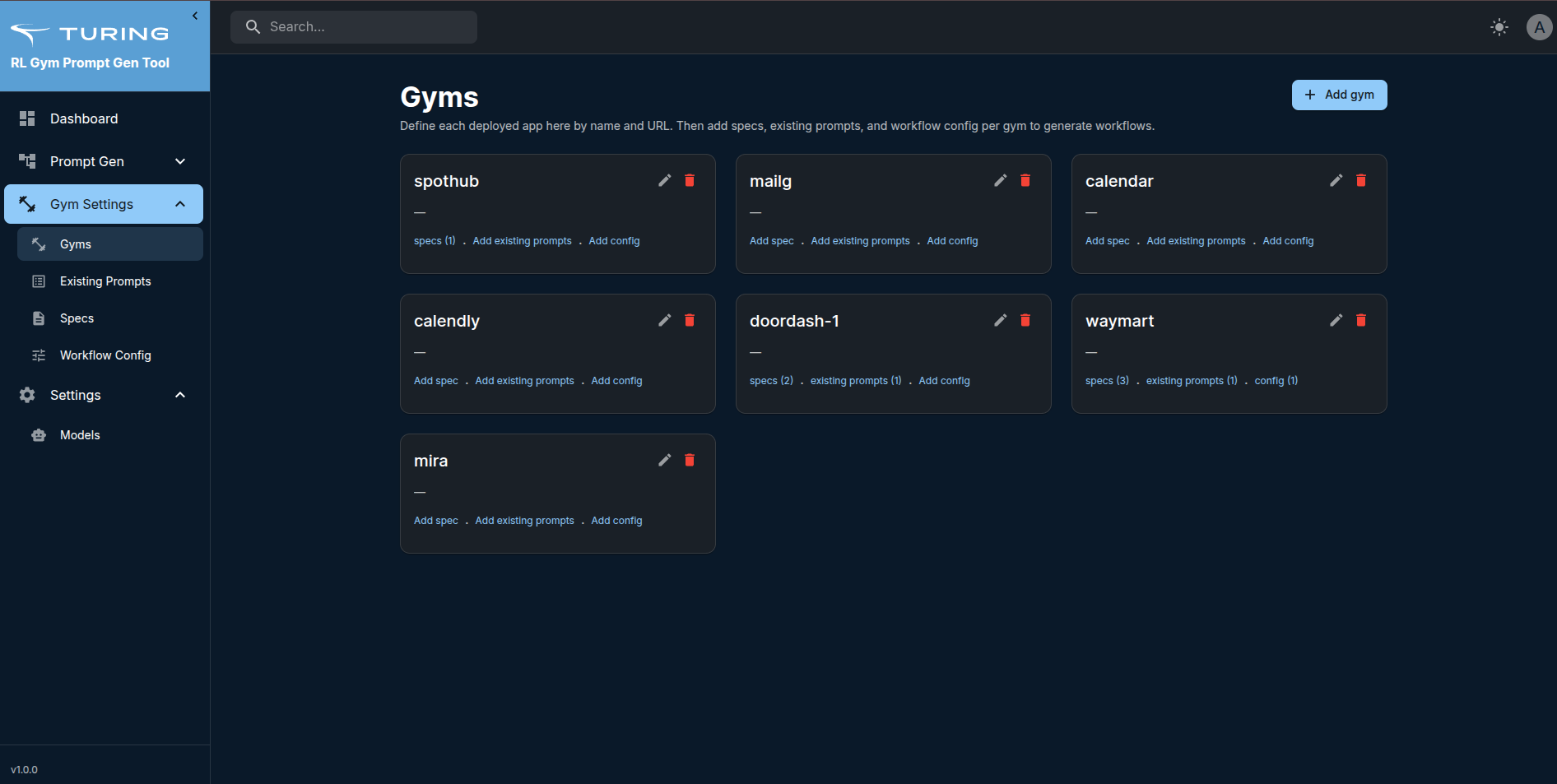
- Navigate to Gym Settings → Gyms
- Click "Add Gym" button (top right)
- Fill in gym details:
- Name: e.g., "WayMart E-commerce"
- Base URL: The gym application's URL (e.g.,
https://app.waymart.rlgym.turing.com) - Business Domain (optional): e.g., "e-commerce", "healthcare"
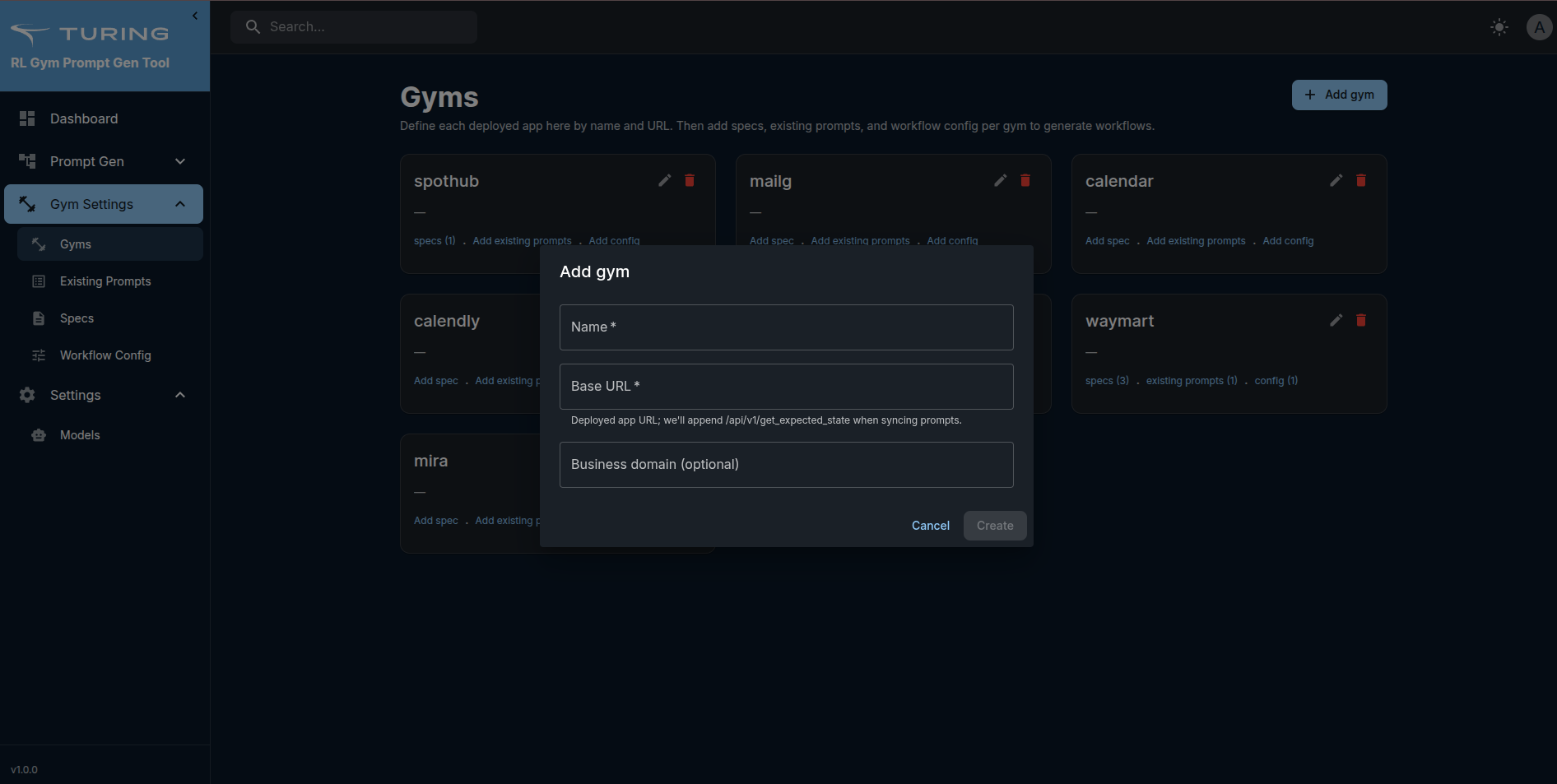
- Click "Create"
- Your gym is now created
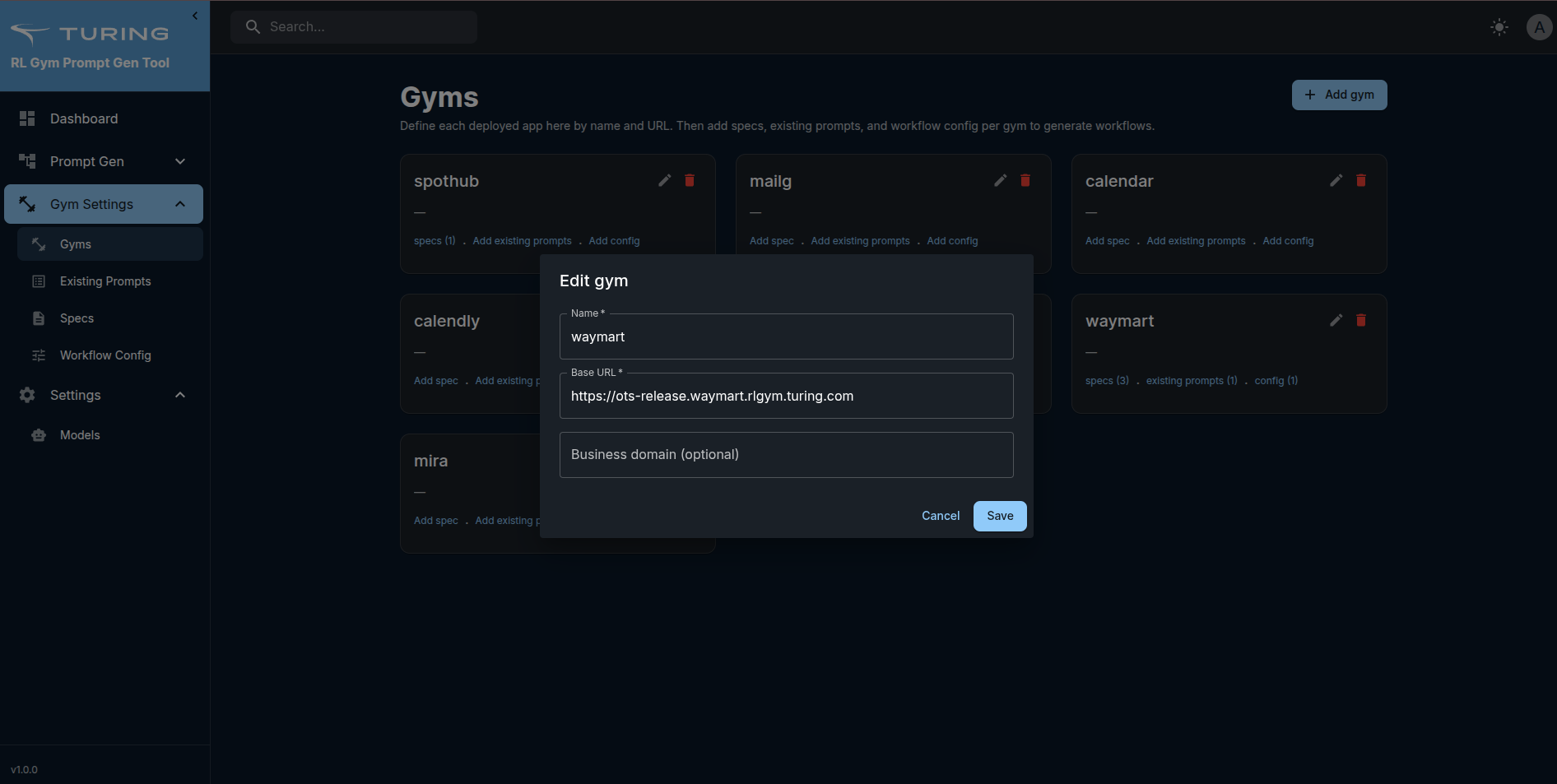
What you can do:
- View all your gyms
- Edit gym details
- Delete gym (with confirmation)
Step 2: Add Existing Prompts
Steps:
- Navigate to Gym Settings → Existing Prompts
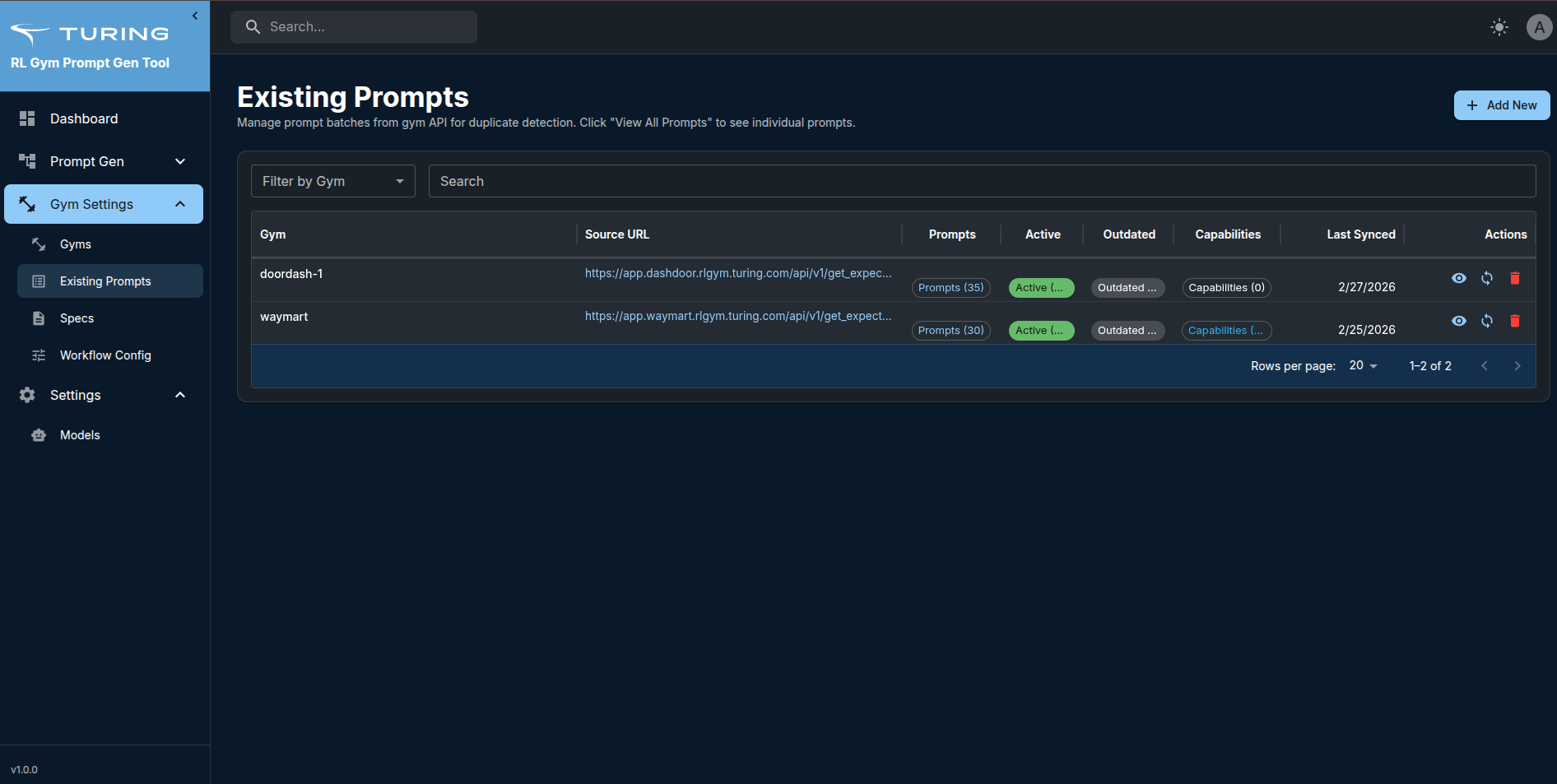
- Click "Add New" button
- Fill in details:
- Gym: Select from dropdown
- Batch Name: Name for this prompt collection (e.g., "WayMart App Version Prompts")
- Applciation URL: URL of the gym like(e.g. https://app.waymart.rlgym.turing.com/)
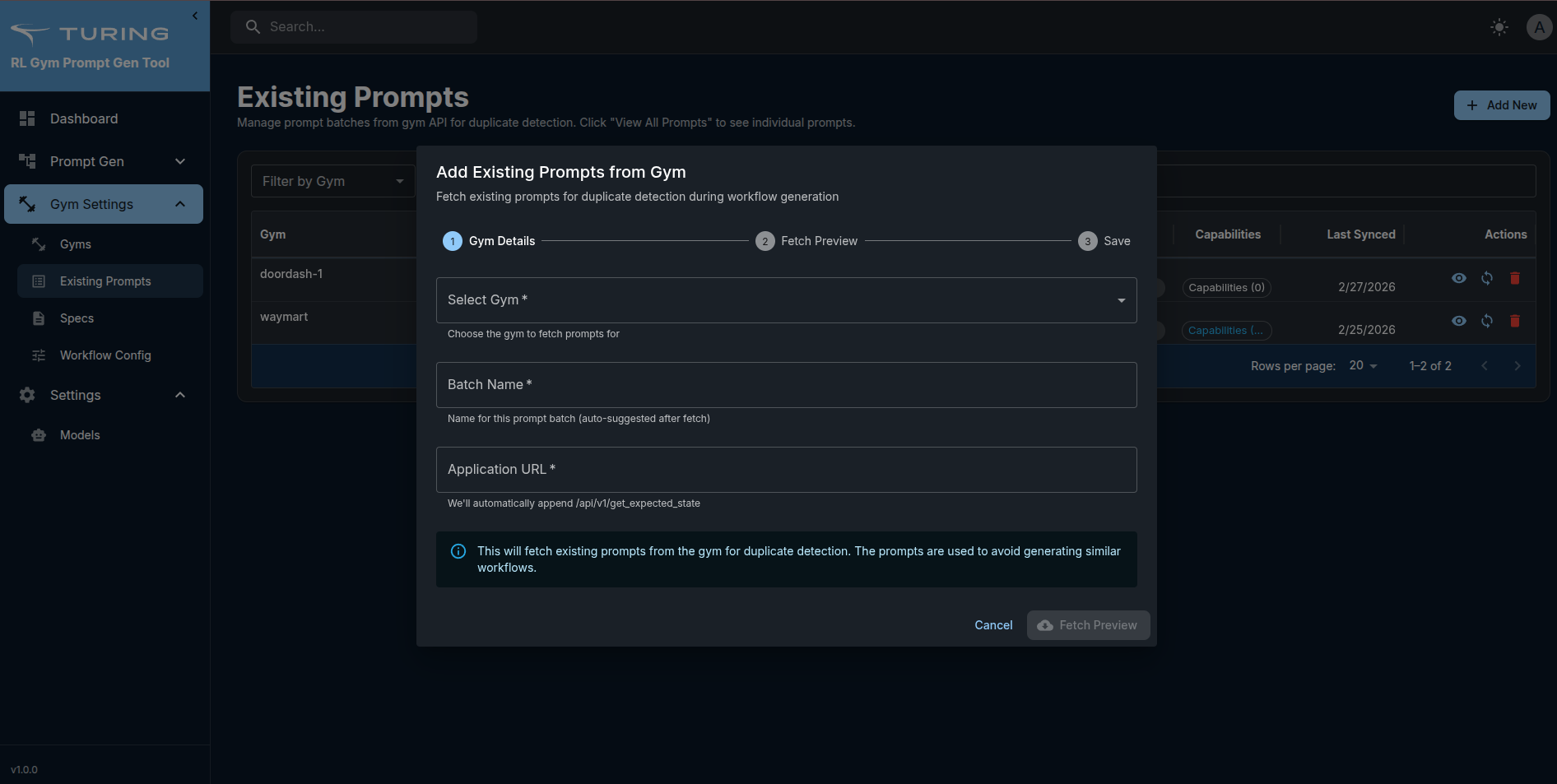
- Click "Fetch Preview" and after preview click "Save Prompts" button.
- Prompts are fetched and stored
Features:
- View all prompt batches by gym
- Sync prompts (refresh from source URL)
- View prompt details in a drawer
- Delete prompt batches
Step 3: Upload Gym Specification Sheet
The spec document describes your gym's features, entities, and capabilities. This is crucial for workflow generation.
Steps:
- Navigate to Gym Settings → Specs
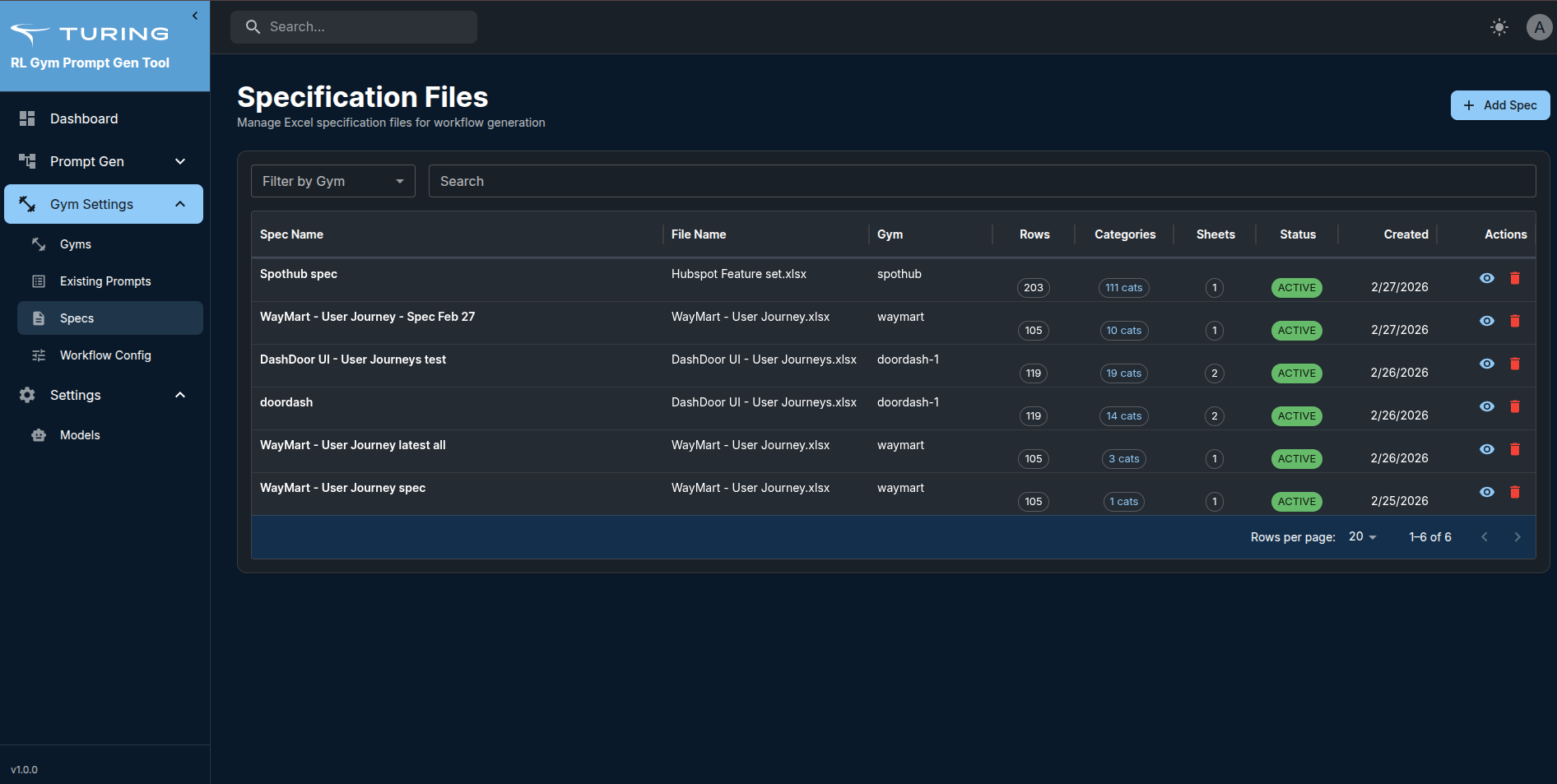
- Click the "Add Spec" button
- Fill in spec details:
- Gym: Select your gym from the dropdown
- Spec Name: Descriptive name (e.g., "WayMart Full Spec v2")
- Upload spec file: Upload the spec document
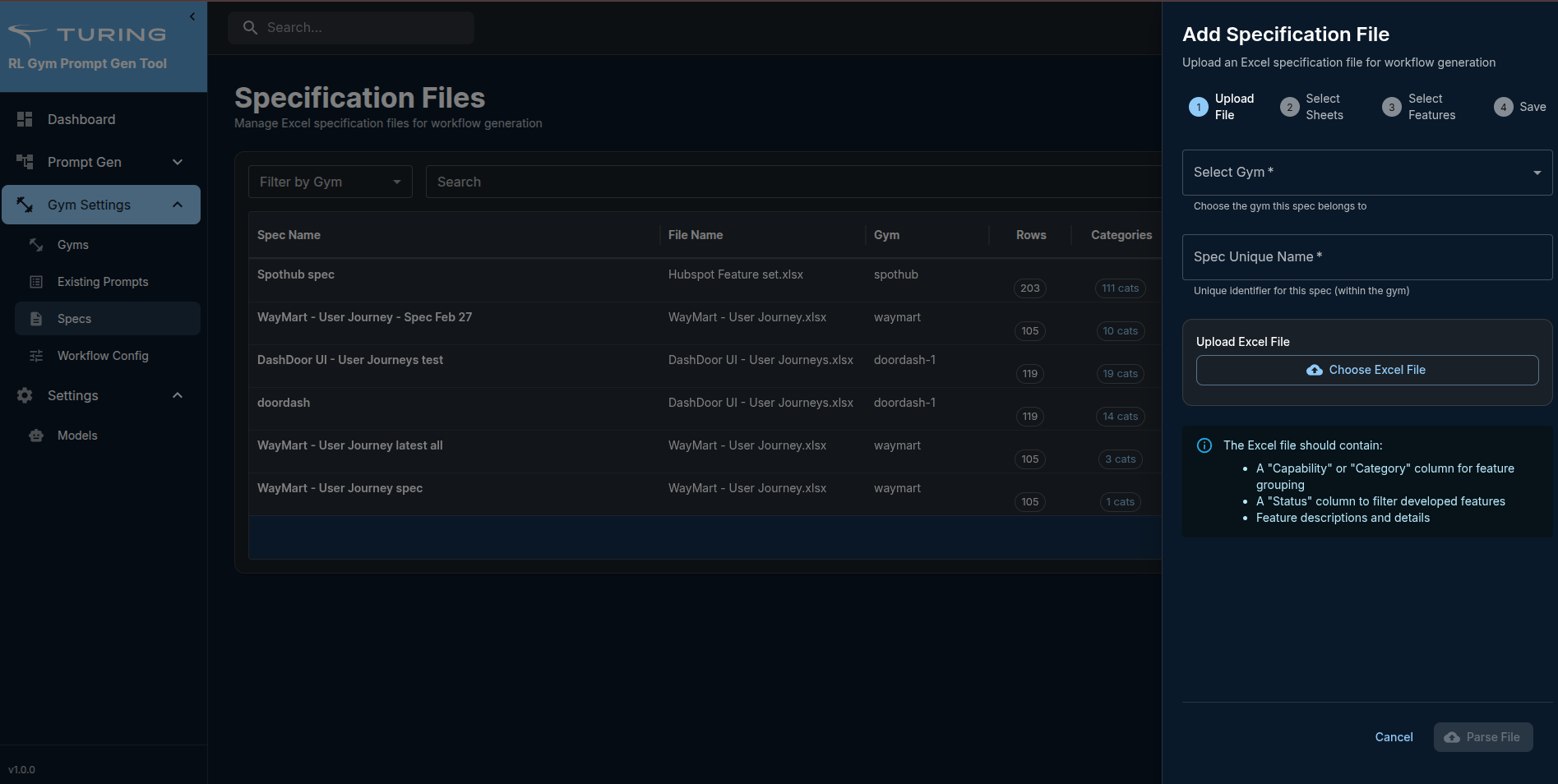
- Click "Parse"
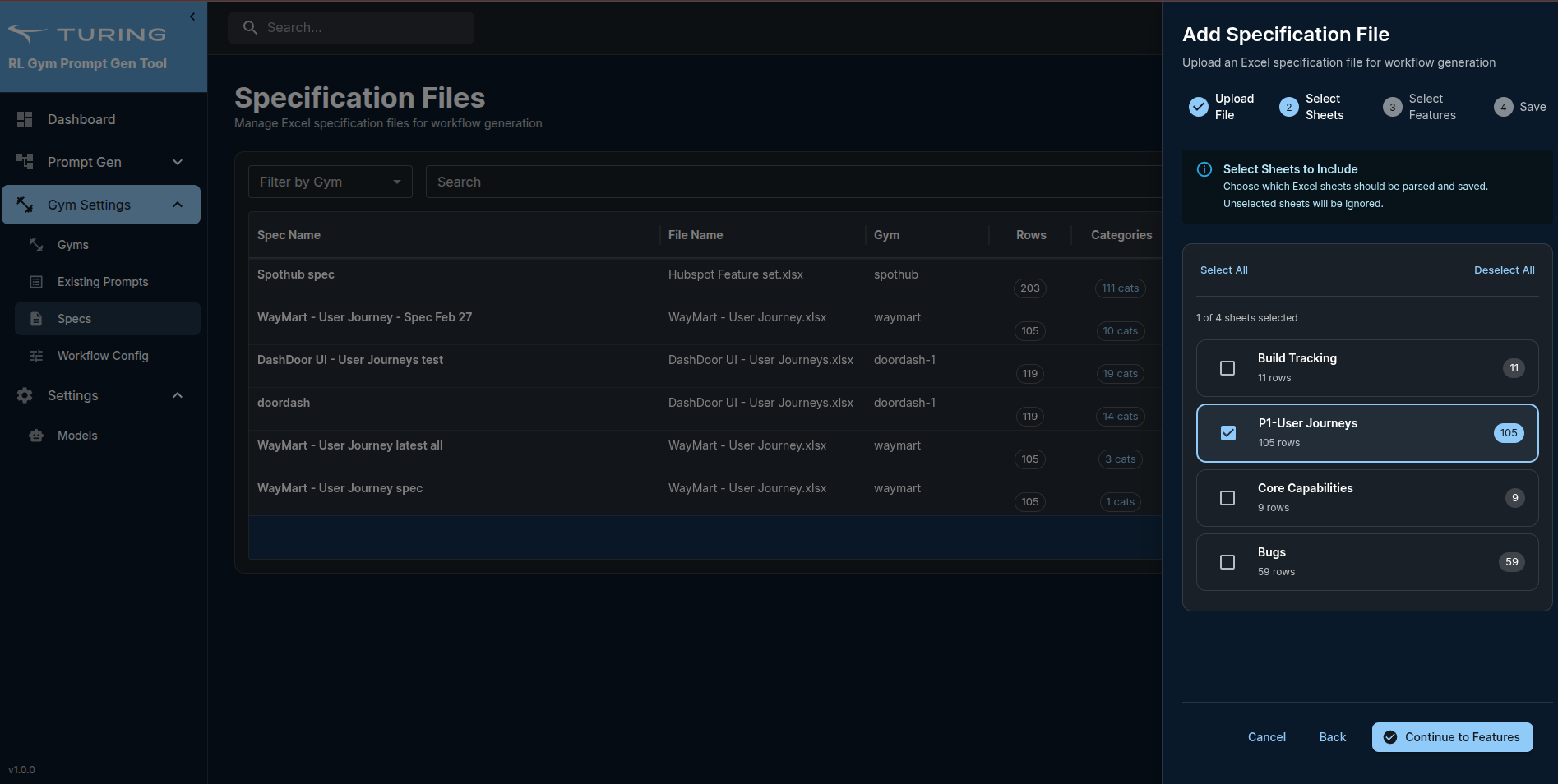
- Select sheet
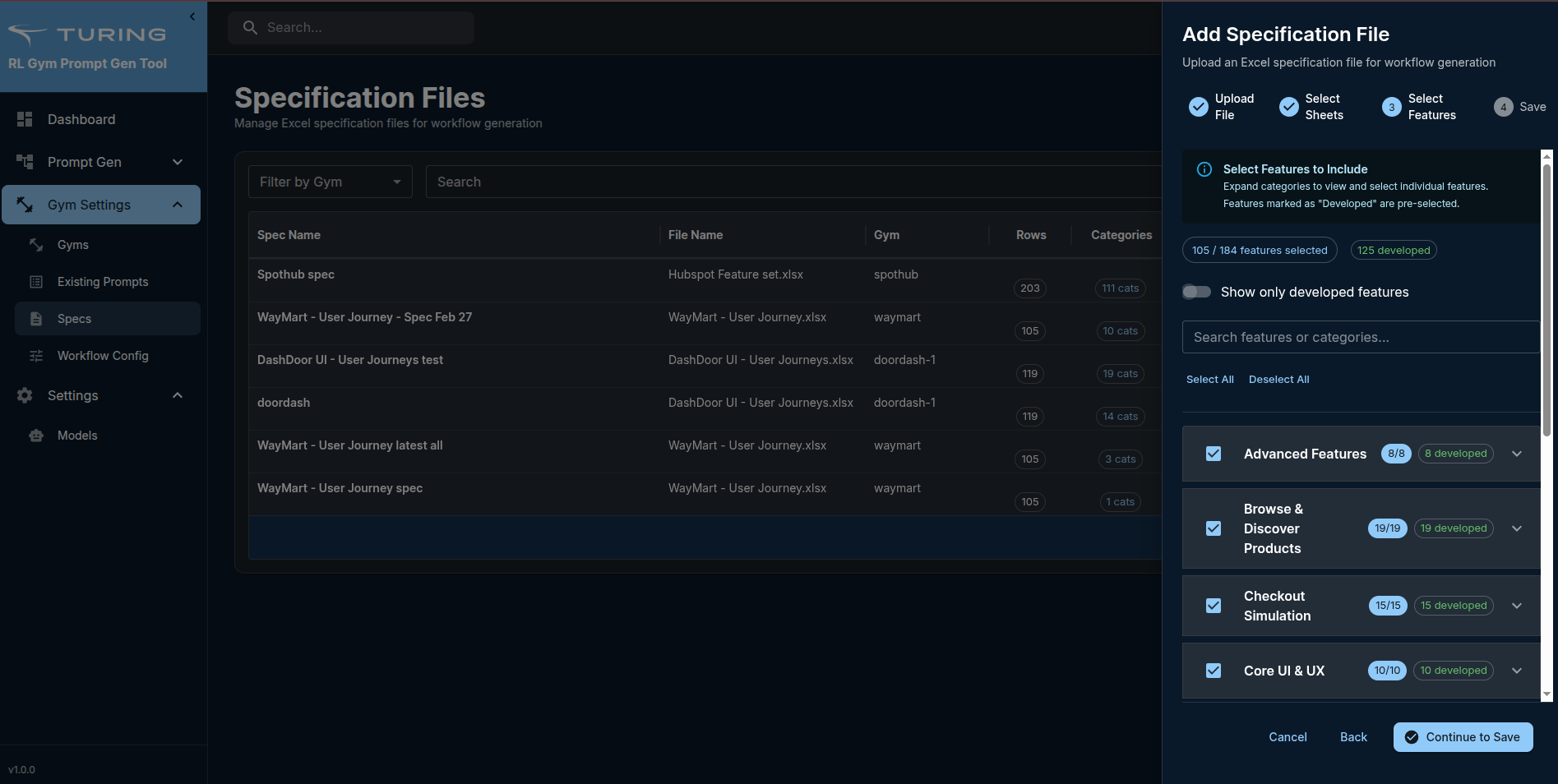
- Select features from the uploaded spec file
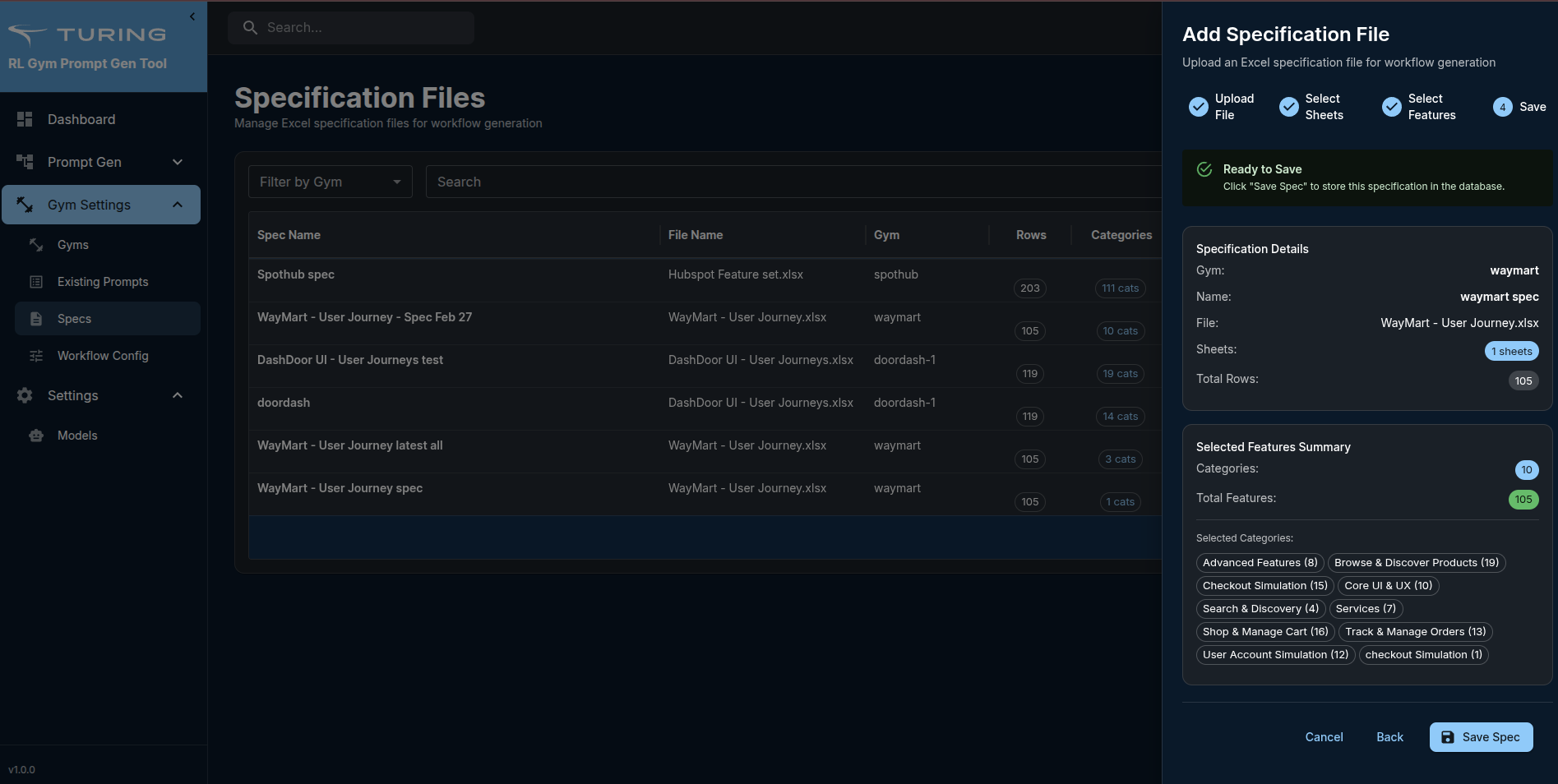
- Click "Save"
Step 4: Create Workflow Configuration
Workflow configuration defines the settings for generating workflows.
Steps:
- Navigate to Gym Settings → Workflow Config
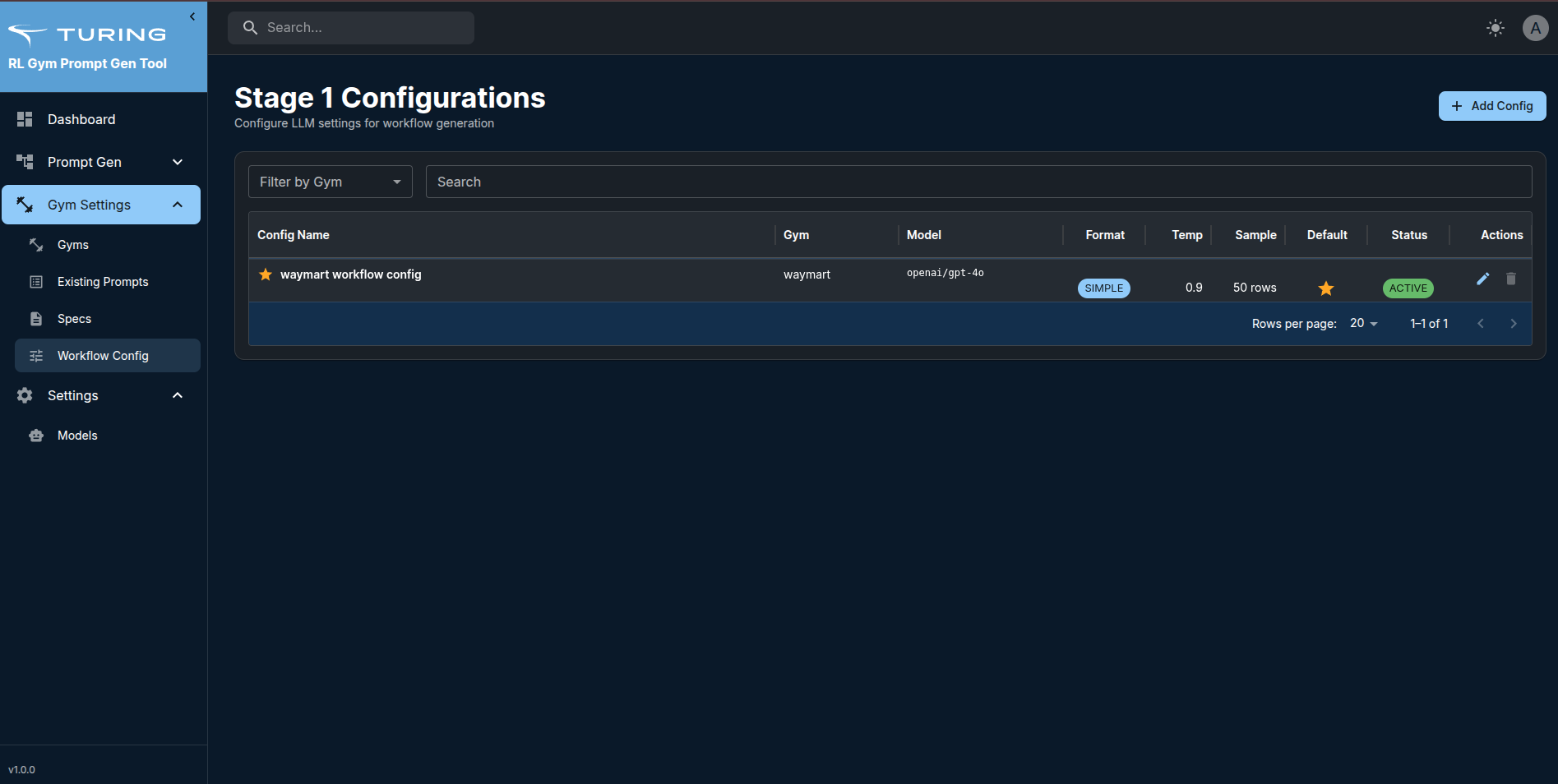
- Click the "Add Config" button
- Fill in configuration:
- Name: e.g., "Balanced Distribution"
- Gym: Select your gym
- Spec: Select the spec to use
- Select LLM Model (configured under the model tab)
- Distribution (counts for each type and difficulty):
- NRD: Simple: 2, Medium: 2, Hard: 6
- RD: Simple: 1, Medium: 1, Hard: 3
- Hybrid: Simple: 1, Medium: 1, Hard: 3
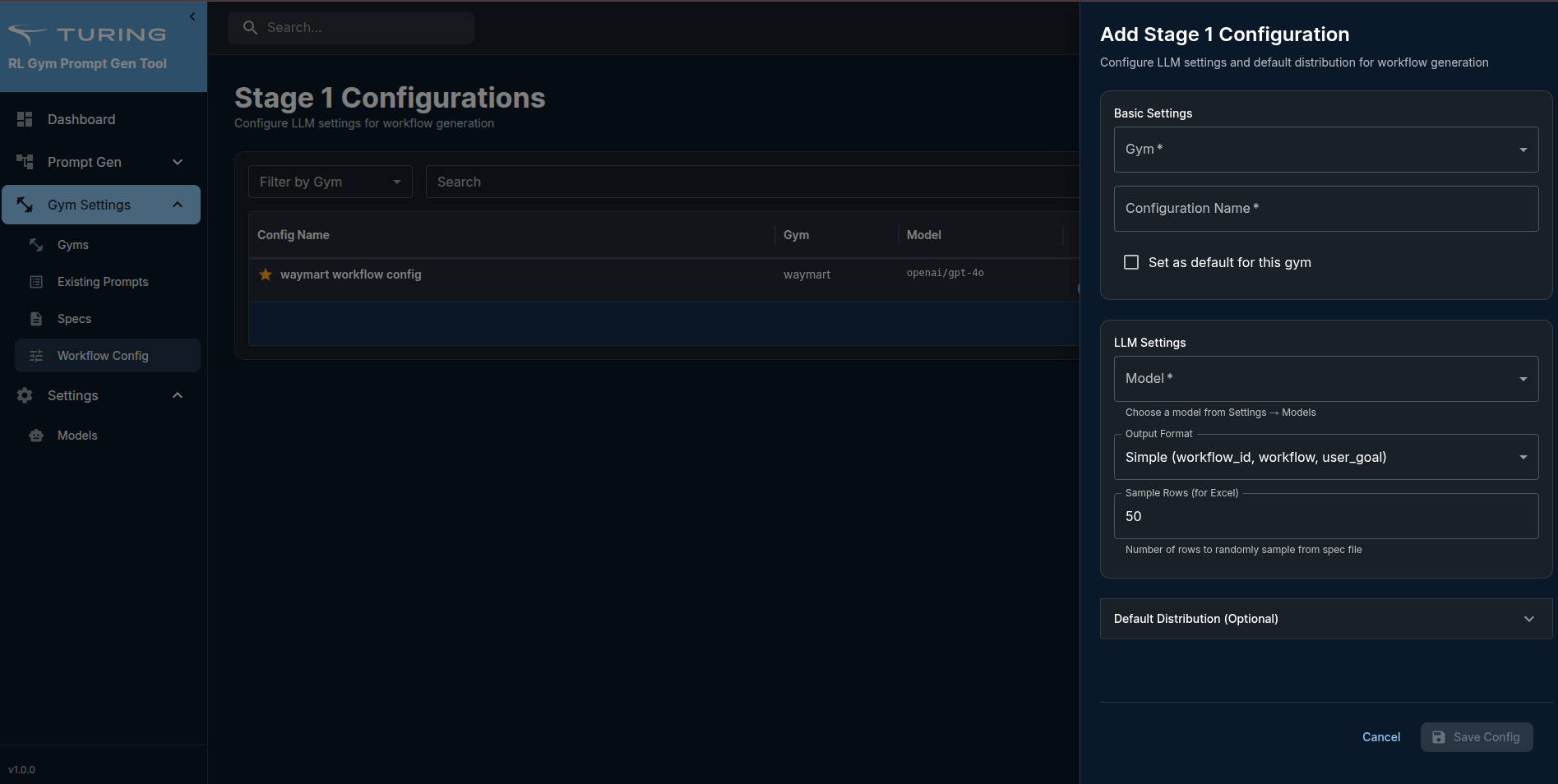
- Click "Add"
- Configuration is saved
Features:
- View all configurations with the gym filter
- Edit configurations
- Set default configuration (marked with a star icon)
- Delete configurations
Step 5: Generate Workflow Batch
Now you're ready to generate workflows!
Steps:
- Navigate to Prompt Gen → Generate Workflow
- Click the "Generate Workflow" button
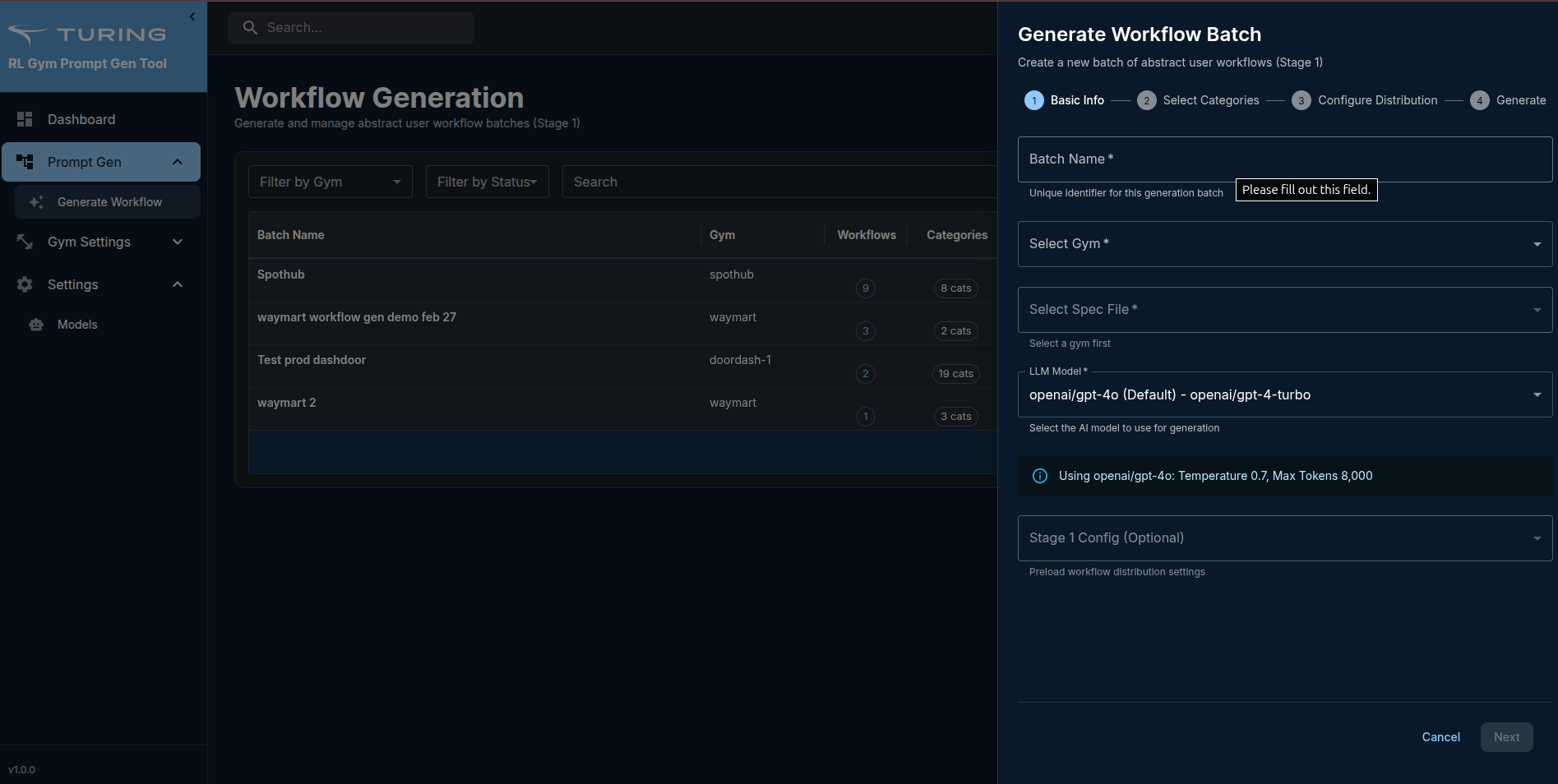
- Fill in generation settings:
- Batch Name: Name for this generation (e.g., "WayMart Workflows Batch 1")
- Gym: Select your gym
- Select Spec File: Select workflow config (or use default)
- Configure Workflow Distribution:
- Specify counts manually:
- NRD: Simple, Medium, Hard counts
- RD: Simple, Medium, Hard counts
- Hybrid: Simple, Medium, Hard counts
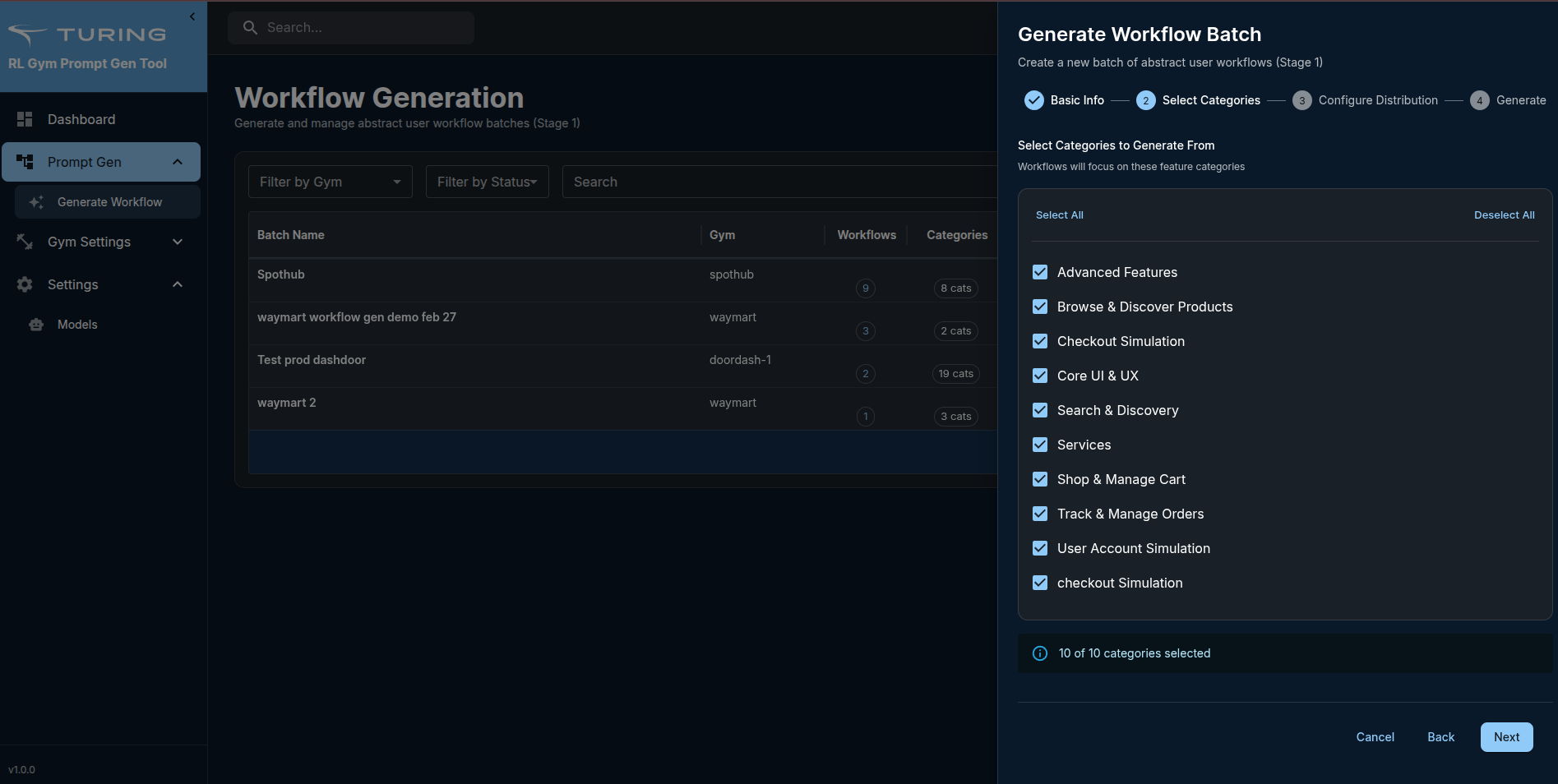
- Click "Next"
- Select categories or update pre-selected
- Select the distribution or update pre-configured distribution
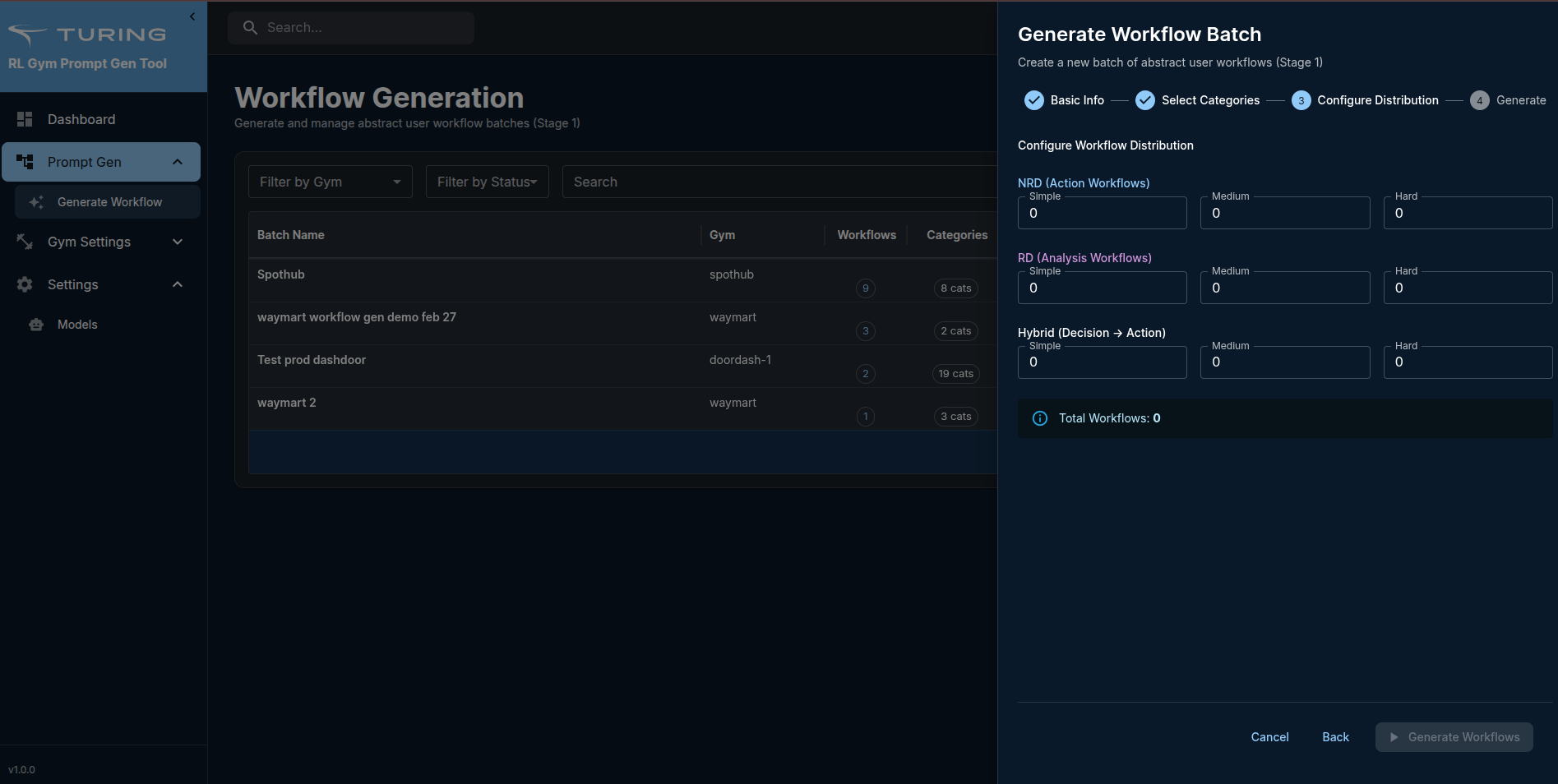
- Click "Generate Workflow" to start workflow generation
What happens:
- The system sends a request to the Python service
- LLM analyzes the gym spec
- Generates workflows based on configuration
- Status updates in real-time
- Batch appears in the table with status "completed"
Monitor Progress:
- The status column shows:
pending,processing,completed,failed - Progress tracking (if generation takes time)
- Error messages if generation fails
Step 6: Review Generated Workflows
Steps:
- Find your batch in the Generate Workflow page table
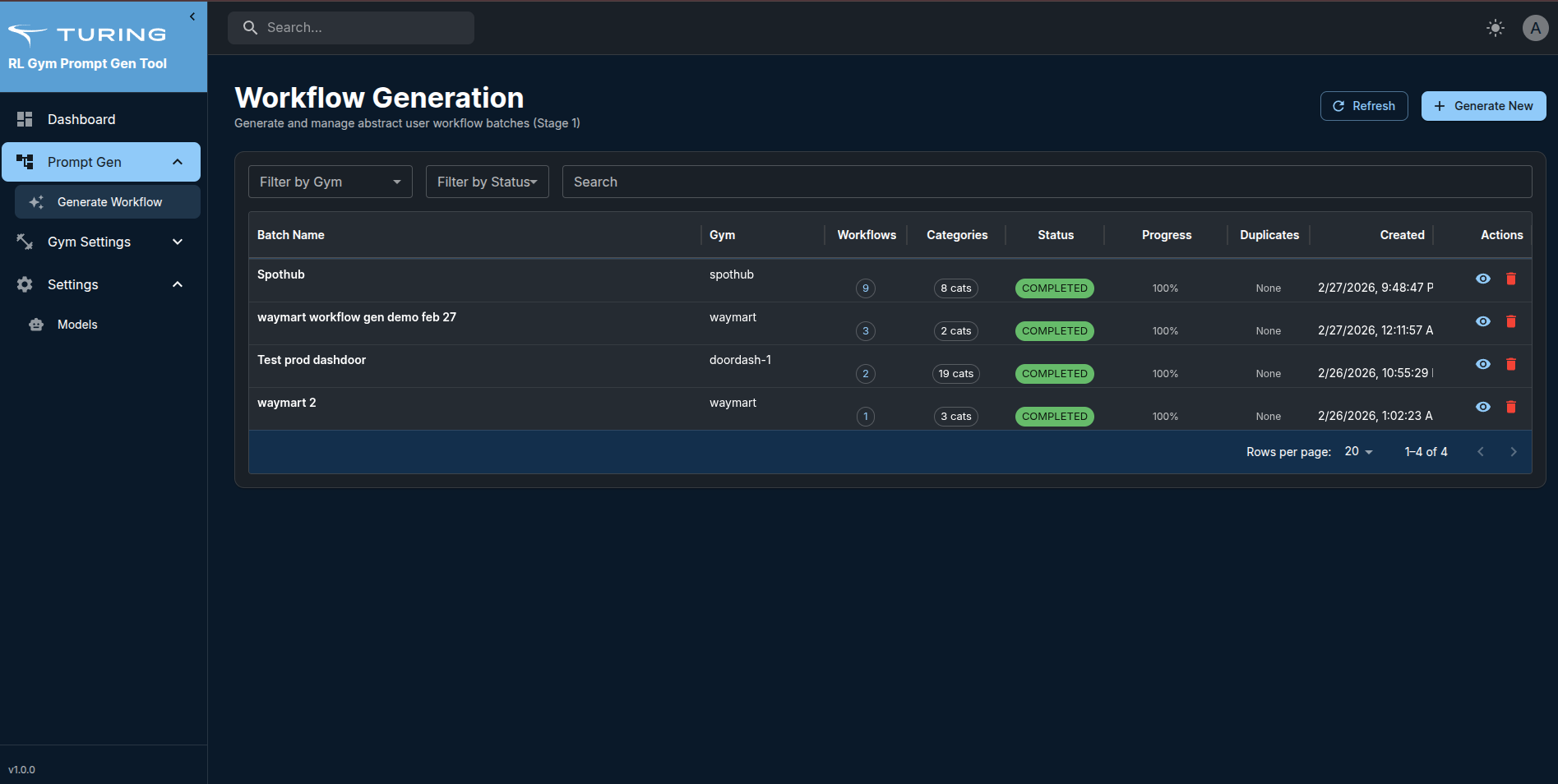
- Click the eye icon to view details
- Detail drawer opens showing:
- Batch metadata (name, gym, spec used, model)
- Total workflows generated
- Breakdown by type (NRD, RD, Hybrid)
- Breakdown by difficulty (Simple, Medium, Hard)
- List of all workflows with:
- Workflow ID
- Description
- Type badge (NRD/RD/Hybrid)
- Complexity badge (Simple/Medium/Hard)
- Actions count
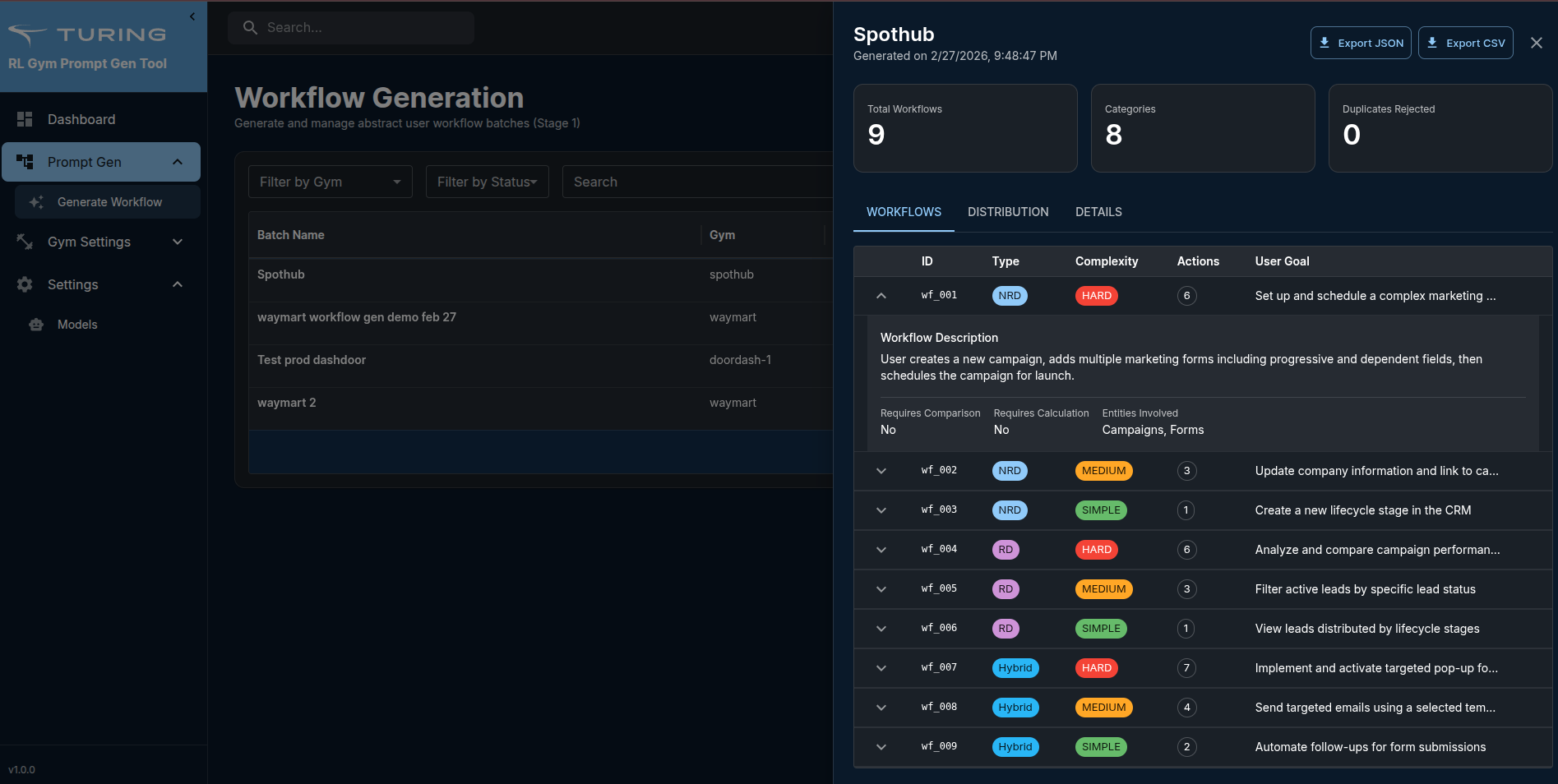
Example Workflow:
{
  "workflow_id": "wf_001",
  "description": "User searches for products in Electronics category, filters by price under $200 and rating above 4 stars, compares top 3 options, then adds the highest-rated one to cart",
  "workflow_type": "Hybrid",
  "complexity": "medium",
  "actions_count": 5,
  "user_goal": "Find and purchase best-rated electronics within budget"
}
What you can do:
- Export workflows (JSON or CSV download)
- Delete batch if not satisfied
- Use workflows for future stages
UI Walkthrough
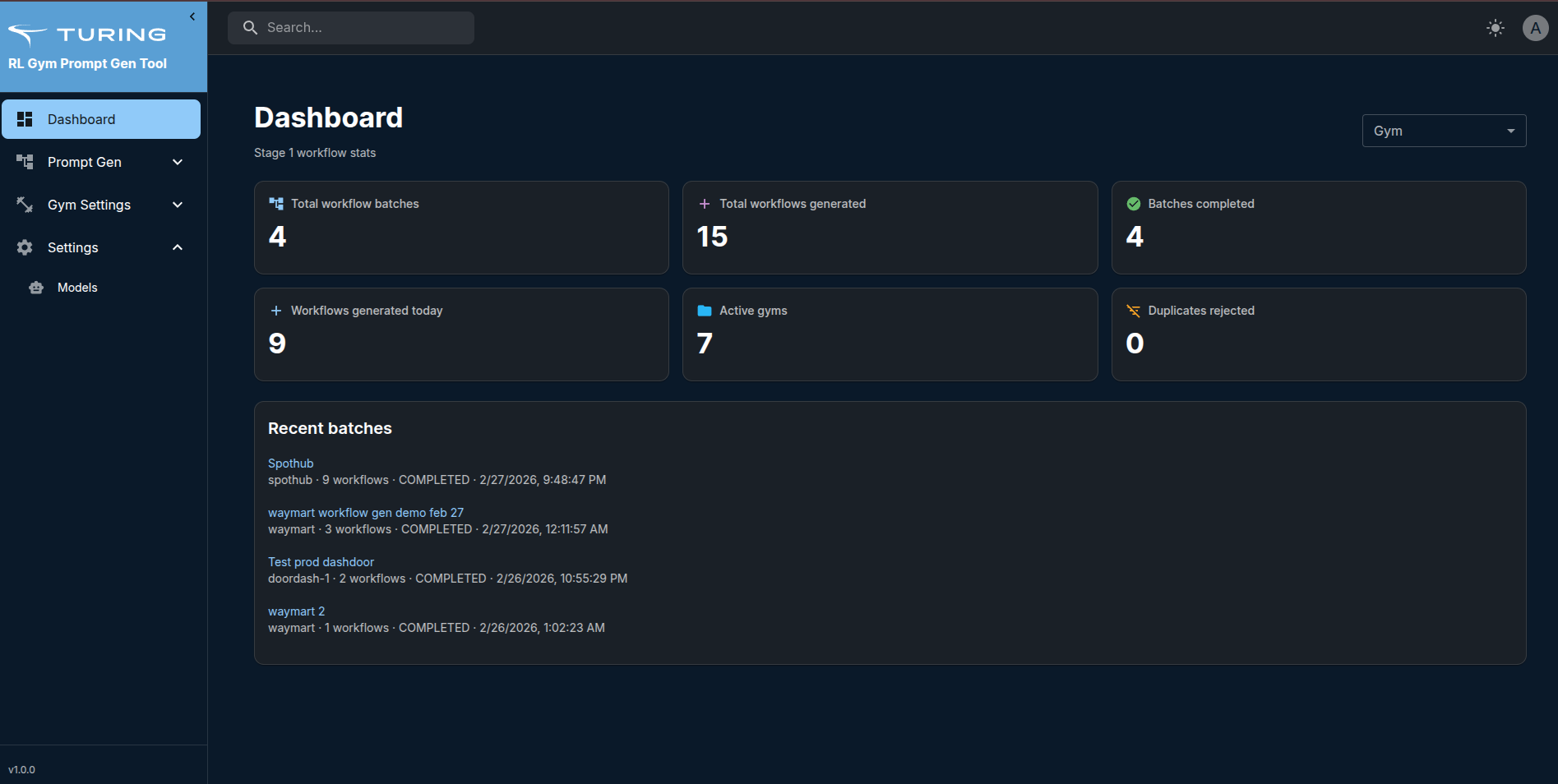
Dashboard
- Overview of system statistics
- Quick access to recent activities
- Summary of gyms, specs, and generations
Gym Settings Section
1. Gyms Page
- Grid layout showing all gyms
- Add Gym button (top right)
- Edit (pencil icon) and Delete (trash icon) for each gym
- Pagination at the bottom
2. Existing Prompts Page
Table view with columns:
- Batch Name
- Gym
- Prompts Count
- Source URL (clickable link)
- Actions (Sync, View, Delete)
Features:
- Filters: Gym dropdown, search box
- Sync button to refresh prompts from source
- View button opens detail drawer
3. Specs Page
Table view with columns:
- Spec Name
- Gym (with chip)
- Type (with color-coded badge)
- Created Date
- Actions (View, Edit, Delete)
Features:
- Filters: Gym dropdown, search box
- Add Spec button opens drawer with form
- View details shows full spec content
4. Workflow Config Page
Table view with columns:
- Config Name
- Gym (with chip)
- Default (star icon)
- Total Workflows
- Model Info
- Actions (Set Default, Edit, Delete)
Features:
- Filters: Gym dropdown, search box
- Add Config opens a comprehensive form to add configuration
Prompt Gen Section
Generate Workflow Page
Table view with columns:
- Batch Name
- Gym (with chip)
- Spec Used
- Status (color-coded badge)
- Total Workflows
- NRD/RD/Hybrid counts
- Created Date
- Actions (View, Export, Delete)
Features:
- Filters: Gym, Status, Search
- Generate Workflow button (top right)
- Real-time updates for generation status
Worflow Generation Drawer:
Two modes:
- Use Saved Config - Select from dropdown
- Custom Counts - Manually specify distribution
Workflow Detail Drawer:
- Batch information card
- Distribution visualization
- Scrollable workflows list
- Export button for JSON download
💬 Help Us Improve!
Share Your Feedback
Your experience matters! Help us make the Prompt Gen Tool better by sharing your feedback.
✓ Report bugs or issues
✓ Suggest new features
✓ Share what works (or doesn't)
✓ Help shape our roadmap
Takes only 3-5 minutes - Your input directly influences our development priorities!