Bug Raising Guide
How to raise clear, actionable bugs in GitHub Projects for OTS gyms.
Where to Raise Bugs
All bugs must be raised as issues in a GitHub Project. Each gym has its own project board.
Don't know which project?
Ask your QA Lead for the correct GitHub project for the gym you are testing. They will also tell you who the development lead is so you can assign the ticket.
Setting Up the Ticket
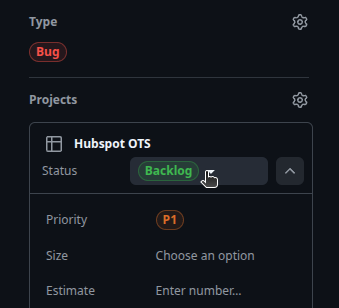
When creating a new issue, configure the following fields:
| Field | Value |
|---|---|
| Type | Bug |
| Status | Backlog |
| Priority | P0, P1, or P2 (see Priority Definitions) |
| Assignee | The development lead for the project (ask your QA Lead if unsure) |
| Label | One of: App, Data, or Task & Verifier (see Bug Labels) |
Your ticket fields should look like this (note: set Status to Backlog, not "Ready"):
Required Information
Every bug must include the following.
1. Clear Title
Write a concise title that describes the problem. A good title lets someone understand the issue without opening it.
- "Verifier passes when item is added to wrong cart category"
- "Contact phone number shows +1 prefix twice on profile page"
- "Send Email button unresponsive after closing compose modal"
- "Verifier issue"
- "Data bug"
- "Button broken"
2. Description
Summarize the problem in a short paragraph. Explain what is happening, where it happens, and why it matters. The reader should understand the impact without looking at the steps yet.
Sample description
Task "Send email to John Smith with subject Meeting Tomorrow" passes verification even when the email is sent with the subject "meeting tomorrow" (lowercase). The assertion email_subject_matches does not perform a case-sensitive comparison, so an incorrect subject is accepted as correct. This means the verifier would not catch an agent that produces the wrong casing.
3. Steps to Reproduce
Provide 100% clear steps starting from the initial state of the app (after a state reset). Anyone reading the steps should be able to reproduce the issue without guessing.
Sample steps
- Go to
/verify_rawand click Reset State - Refresh the main app
- Navigate to Contacts → John Smith
- Click Send Email
- Enter subject: "meeting tomorrow" (all lowercase, intentionally wrong)
- Enter body: "Looking forward to our meeting."
- Click Send
- Go to
/verify_raw→ select task "Send email to John Smith" - Run the verifier
Start from initial state
Always write steps starting from a fresh state reset. Do not assume the reader has performed any prior actions.
4. Expected Outcome vs Actual Outcome
Clearly state what should happen and what actually happens.
The assertion email_subject_matches should fail because the subject "meeting tomorrow" does not match the expected value "Meeting Tomorrow".
The assertion email_subject_matches passes. The verifier accepts "meeting tomorrow" as a match for "Meeting Tomorrow", ignoring the case difference.
5. Screenshots and Videos
- Screenshots are highly encouraged — they help developers understand the issue faster.
- Videos are especially useful for bugs that involve a sequence of interactions (e.g. multi-step flows, drag-and-drop, timing-dependent behavior).
Record your testing session
If you are testing a complex flow, consider recording your screen from the start. This makes it easy to attach evidence when something goes wrong.
6. Environment Details
Include the URL you tested on, the browser, and the branch (e.g. ots_dev, ots_release).
https://ots-dev.forcesales.rlgym.turing.com/ · Chrome 130 · ots_dev
Severity Definitions
P0 — Critical
Severe UI/system issues that block workflows, cause crashes, introduce security risks, or significantly degrade user experience.
Examples
- Landing page UI issues
- Inability to perform tasks due to UI
- Security vulnerabilities (unauthorized access)
- Data loss after submission
- Broken primary features
- Timezone inconsistencies
- Time-based feature failures
- App crashes
- Dead ends/errors (404, 500, 403, etc.)
- Severe UI overlap issues
- Slow response (>3 seconds)
- Local storage persistence issues
- UI blocking user progress
P1 — High
UI issues that affect non-critical features but do not block main workflows.
Examples
- Broken UI not affecting primary workflows
P2 — Medium/Low
Minor UI issues with low impact on usability.
Examples
- Any other UI issues
P0 — Critical
Issues that make tasks unusable, unclear, logically incorrect, or time-sensitive to failure.
Examples
- Duplicate tasks
- Incorrect or illogical prompts
- Missing required data
- Ambiguous prompts
- Tasks becoming invalid within a month
P1 — High
Redundancy and lack of diversity in tasks that reduce overall effectiveness.
Examples
- Repetitive/similar tasks using same flows
P2 — Medium/Low
Minor task-related issues with limited impact on execution.
Examples
- Any other task-related issues
P0 — Critical
Issues that make verification unreliable, incorrect, or inconsistent, leading to invalid results.
Examples
- Verifier failing correct tasks
- Overly generic assertions
- Missing/incorrect assertions
- Incorrect initial state handling (localStorage)
- No negative assertions
- Missing RD operators or incorrect thresholds
- Invalid spec objects
- Verifier instability over time
- Inconsistent results across runs
P1 — High
Issues that reduce the strength and precision of verification logic.
Examples
- Assertion ordering issues
- Weak negative assertions
P2 — Medium/Low
Minor verifier issues with limited impact on overall accuracy.
Examples
- Any other verifier issues
P0 — Critical
Critical data issues that break functionality, cause crashes, create confusion, or prevent proper usage.
Examples
- Issues in landing page data
- Duplicate records
- Malformed data causing crashes
- Images not loading
- Data mismatch with context
- Lack of data diversity
- Insufficient data volume
P1 — High
Data quality issues affecting realism and freshness but not immediately breaking the system.
Examples
- Timeliness issues
- Unrealistic data (e.g., incorrect brand-category mapping)
P2 — Medium/Low
Lower-impact or edge-case data issues not covered in higher priorities.
Examples
- Any other data-related issues
Bug Labels
Each bug must have exactly one of the following labels. This determines which team triages the issue.
Use for problems in the gym application itself — the UI, functionality, or behavior.
- Broken layout, missing elements, wrong styling
- Buttons or links that do not work
- Features that behave differently than expected
- Performance issues
Use for problems with the data displayed in the app — wrong values, missing records, or incorrect content.
- Wrong phone numbers, emails, or names
- Missing records that should be present
- Incorrect prices, dates, or quantities
- Data that does not match the prompt requirements
Use for problems with the task definition or the verifier logic, not the app itself.
- An assertion fails when the task was performed correctly
- An assertion passes when the task was performed incorrectly
- A task is tagged with the wrong type (e.g. NRD instead of Hybrid)
- The prompt description is ambiguous or contradicts the assertions
One Issue, One Label
Keep issues atomic
Each bug ticket should describe one problem and carry one label. Do not combine multiple unrelated issues into a single ticket.
| Ticket | Label |
|---|---|
| "Cart total wrong" | Data |
| "Send button misaligned" | App |
| "Task 5 verifier passes on wrong state" | Task & Verifier |
| Ticket | Labels |
|---|---|
| "Cart total wrong + send button misaligned + verifier fails on task 5" | Data, App, Task & Verifier |
If you discover multiple issues during a testing session, create a separate ticket for each one. This makes triage faster and ensures nothing gets lost.